Advertisement
CRM Software – CRM software centralizes customer data from diverse channels—sales, marketing, support—into unified profiles, enabling businesses to streamline interactions, automate workflows, and enhance customer satisfaction. Modern CRM platforms leverage AI-powered analytics and cloud infrastructure to deliver real-time insights, predictive sales forecasting, and personalized engagement across devices. Integrations with email, social media, and accounting software further unify business processes, driving efficiency and collaboration. This article explores CRM software’s core functions, its evolving AI capabilities, and practical benefits for businesses of all sizes and industries.
What is CRM Software?
Customer Relationship Management (CRM) software is a technology solution designed to consolidate, organize, and analyze customer information to improve business relationships and operational efficiency. Traditionally, CRM emerged as manual record-keeping systems, evolving through desktop applications to today’s AI-powered cloud platforms. The core purpose remains consistent: to maintain a 360-degree view of the customer lifecycle and optimize interactions from lead generation to post-sale support.
The transition to cloud-based CRM in the early 2010s revolutionized accessibility, enabling global teams to collaborate in real time without complex IT infrastructure. Today’s CRM solutions, such as Salesforce, Zoho CRM, and Microsoft Dynamics 365 CRM, incorporate artificial intelligence and machine learning to automate routine tasks, detect sales opportunities, and deliver personalized marketing campaigns. This evolution reflects a shift from data storage tools to strategic business enablers.
Advertisement
How CRM Software Works
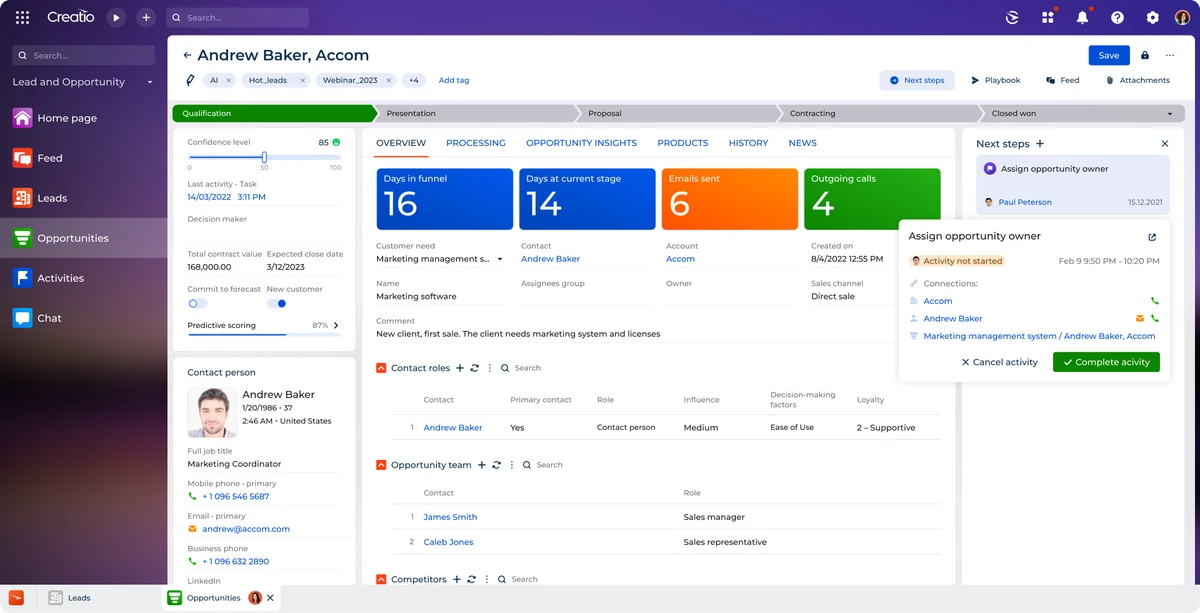
CRM software functions by aggregating customer data from multiple touchpoints—websites, social media, email campaigns, phone calls—into a centralized database. This unified customer view allows sales, marketing, and service teams to access consistent, up-to-date information, minimizing data silos and redundant communications. For example, a salesperson can see the entire history of interactions, enabling tailored pitches based on customer behavior and preferences.
Automation is a cornerstone of CRM operations. sales automation streamlines lead tracking, follow-ups, and deal management, reducing manual data entry. Marketing automation manages email workflows, segmentations, and campaign performance analysis. Customer service modules track support tickets and automate responses using AI chatbots. These interconnected functionalities improve responsiveness and reduce operational overhead.
Integration capabilities extend CRM’s value by connecting it with external business tools like email platforms (Outlook, Gmail), accounting software (QuickBooks, Xero), and social media channels (Facebook, LinkedIn). This creates a seamless ecosystem where customer insights flow freely across departments, enhancing collaboration and strategic decision-making.
Key Features of Modern CRM Software
AI and machine learning stand out as transformative features in contemporary CRM systems. AI algorithms analyze customer data to predict buying behavior, segment leads by conversion likelihood, and recommend next-best actions for sales reps. For instance, Salesforce Einstein uses AI to generate personalized sales forecasts and identify upsell opportunities, improving pipeline accuracy.
Cloud accessibility enables CRM platforms to support remote and hybrid work environments. Mobile apps provide on-the-go access to customer records, task management, and communication tools, ensuring teams remain productive outside traditional offices. Cloud hosting also reduces IT maintenance costs and scales easily with business growth.
Advanced analytics and reporting dashboards provide data-driven insights into customer engagement, campaign effectiveness, and sales performance. Customizable reports allow managers to track KPIs in real time, facilitating agile responses to market changes. workflow automation tools help standardize processes, assign tasks, and trigger alerts, enhancing operational efficiency.
Benefits of Using CRM Software
The primary benefit of CRM software is enhanced customer relationship management through personalized and timely interactions. By centralizing customer data, businesses can segment audiences accurately and tailor marketing messages, leading to higher engagement and satisfaction rates. Research from Gartner indicates organizations using CRM report up to 27% increase in customer retention.
Sales efficiency improves as CRM automates lead nurturing and shortens sales cycles. Automated reminders and pipeline visibility enable sales teams to prioritize high-value prospects and close deals faster. Microsoft Dynamics 365 CRM users have documented a 20% increase in sales productivity through AI-driven insights.
Cross-department collaboration benefits from shared customer data, reducing friction between sales, marketing, and support teams. Integrated communication and unified workflows foster transparency and coordinated efforts. Targeted marketing campaigns and proactive customer service contribute to better retention rates and reduced churn.
Types of CRM Systems
CRM systems generally fall into three categories based on their primary focus:
- Operational CRM: Focuses on automating customer-facing processes such as sales automation, marketing campaigns, and customer service management. It streamlines daily interactions and task execution.
- Analytical CRM: Emphasizes data analysis, customer segmentation, and predictive modeling to inform strategic decisions. It leverages AI to generate insights from customer data.
- Collaborative CRM: Facilitates information sharing across departments and external stakeholders, improving communication and joint customer management efforts.
Many modern platforms, including Zoho CRM and Maximizer CRM, blend these functionalities to provide comprehensive solutions tailored to diverse business needs.
Who Uses CRM Software?
CRM adoption spans startups, SMEs, and large enterprises across industries. Small businesses leverage cloud CRM for affordability and ease of use, gaining access to sales automation and customer insights without heavy IT investments. For example, a retail startup may use Zoho CRM to manage customer interactions and automate marketing emails with limited resources.
Large enterprises deploy robust platforms like Salesforce and Microsoft Dynamics 365 CRM to handle complex sales pipelines, multi-channel marketing, and global customer service. Industries such as finance, healthcare, and manufacturing use CRM for compliance tracking, lead management, and after-sales service.
Nonprofits also benefit from CRM by managing donor relationships, volunteer coordination, and campaign tracking. Cloud CRM enables remote teams to collaborate efficiently while maintaining up-to-date constituent data.
CRM Software Integration and Ecosystem
Integrations extend CRM capabilities by connecting it with complementary business systems. marketing automation tools synchronize campaign data and lead scoring with CRM databases, providing sales teams with qualified prospects. Accounting software integration automates invoicing and payment tracking linked to customer profiles.
Project management platforms, such as Asana or Trello, integrate to coordinate tasks related to customer projects or support cases. Communication tools like Slack and Microsoft Teams enhance real-time collaboration within CRM workflows.
These integrations provide unified data flows, reducing manual entry errors and improving overall business process efficiency. Organizations benefit from holistic customer views that combine financial, operational, and engagement data.
The Role of AI in CRM
AI integration in CRM delivers advanced customer insights and automates routine interactions. Predictive analytics forecast sales trends and customer lifetime value, enabling proactive resource allocation. For example, AI-driven lead scoring helps prioritize high-potential prospects, increasing conversion rates.
Automated chatbots handle common customer queries, freeing human agents to focus on complex issues. Machine learning algorithms personalize marketing messages based on behavioral patterns, improving campaign effectiveness.
AI-powered sales forecasting tools analyze historical data and external factors to provide accurate revenue predictions, supporting strategic planning. These capabilities reduce human bias and enhance decision-making precision.
Choosing and Implementing CRM Software
Selecting the right CRM requires evaluating business size, industry-specific needs, integration requirements, and budget constraints. Key considerations include user interface intuitiveness, customization options, AI functionalities, and scalability.
Implementation challenges often involve data migration, user adoption resistance, and process redesign. Best practices involve phased rollouts, comprehensive training, and continuous support to ensure successful integration into business workflows.
Businesses should prioritize CRM platforms offering strong customer support, security compliance, and vendor reliability. Ongoing evaluation of CRM performance metrics ensures alignment with evolving organizational goals.
CRM Software |
Key Features |
AI Capabilities |
Ideal Business Size |
Cloud-Based |
|---|---|---|---|---|
Salesforce |
Sales automation, marketing automation, analytics dashboards, customizable workflows |
Einstein AI for predictive analytics and lead scoring |
SMEs to Enterprises |
Yes |
Zoho CRM |
Multichannel communication, AI assistant (Zia), workflow automation |
AI for sales predictions and sentiment analysis |
Startups to SMEs |
Yes |
Microsoft Dynamics 365 CRM |
Integrated ERP, sales and service automation, advanced reporting |
AI-powered insights and forecasting |
Mid-market to Enterprises |
Yes |
Maximizer CRM |
Contact management, sales force automation, marketing tools |
Basic AI for customer data analytics |
SMEs |
Yes |
This table compares leading CRM platforms, illustrating differences in AI sophistication, features, and target users.
FAQ
What is the main purpose of CRM software?
CRM software centralizes and organizes customer data to improve relationship management, automate sales and marketing processes, and enhance customer satisfaction through personalized interactions and data-driven insights.
How does AI enhance CRM systems?
AI enhances CRM by enabling predictive analytics, automating routine tasks like lead scoring and customer support, personalizing customer experiences, and improving sales forecasting accuracy.
Can small businesses benefit from CRM software?
Yes, cloud-based CRM platforms offer affordable, scalable solutions ideal for small businesses to automate sales, manage customer data, and improve marketing effectiveness without extensive IT resources.
What are common CRM integration options?
Common integrations include email platforms, social media management tools, accounting software, marketing automation systems, and communication apps to unify customer data and streamline workflows.
What challenges might companies face when implementing a CRM?
Challenges include data migration complexity, user adoption resistance, customization needs, and aligning CRM processes with existing business workflows. Proper planning, training, and support are essential for success.
Customer relationship management software continues to evolve rapidly, with AI and cloud technologies at the forefront of innovation. Businesses adopting modern CRM solutions gain competitive advantages through improved customer insights, operational efficiencies, and enhanced sales and marketing strategies. Future CRM developments will likely deepen AI capabilities, increase automation sophistication, and expand integration ecosystems, enabling even more personalized and efficient customer engagement.
For further details on CRM software functionalities and AI integration, see Salesforce’s CRM overview and Microsoft Dynamics 365 CRM resources.
Advertisement