Advertisement
CRM Software – SaaS CRM and on-premise CRM represent fundamentally different deployment models for Customer Relationship Management software, each with distinct implications for cost, control, security, scalability, and customization. SaaS CRM is cloud-hosted and accessed via internet subscriptions, offering businesses rapid implementation, lower upfront costs, and seamless scalability. Conversely, on-premise CRM is installed on company-owned servers, providing enhanced control over data, extensive customization options, and compliance flexibility, but requires a significant initial investment and sustained IT resources. Understanding these core differences is essential for businesses striving to select a CRM solution aligned with their operational needs and growth strategies.
SaaS CRM solutions like Salesforce, HubSpot, and SugarCRM deliver vendor-managed platforms where updates, maintenance, and data security are outsourced, enabling businesses to focus on core activities without heavy IT overhead. On-premise CRM, favored by organizations with strict regulatory requirements or unique workflows, demands internal IT teams to manage infrastructure, software customization, and compliance adherence. Real-world examples illustrate these contrasts: Education First utilized SaaS CRM to rapidly establish a call center with minimal IT burden, while Guidesly integrated SaaS communication tools with HubSpot’s CRM to enhance sales processes, demonstrating SaaS’s agility and integration capabilities.
Core Differences Between SaaS and On-Premise CRM
The fundamental distinction lies in hosting and access method. SaaS CRM is hosted on vendor servers, accessible through browsers or dedicated apps, leveraging internet connectivity. This cloud CRM model eliminates the need for physical infrastructure and shifts maintenance responsibilities to the vendor. On-Premise CRM is installed locally on corporate servers, granting organizations full ownership of their data environment but requiring significant IT involvement for setup, upkeep, and scalability.
Advertisement
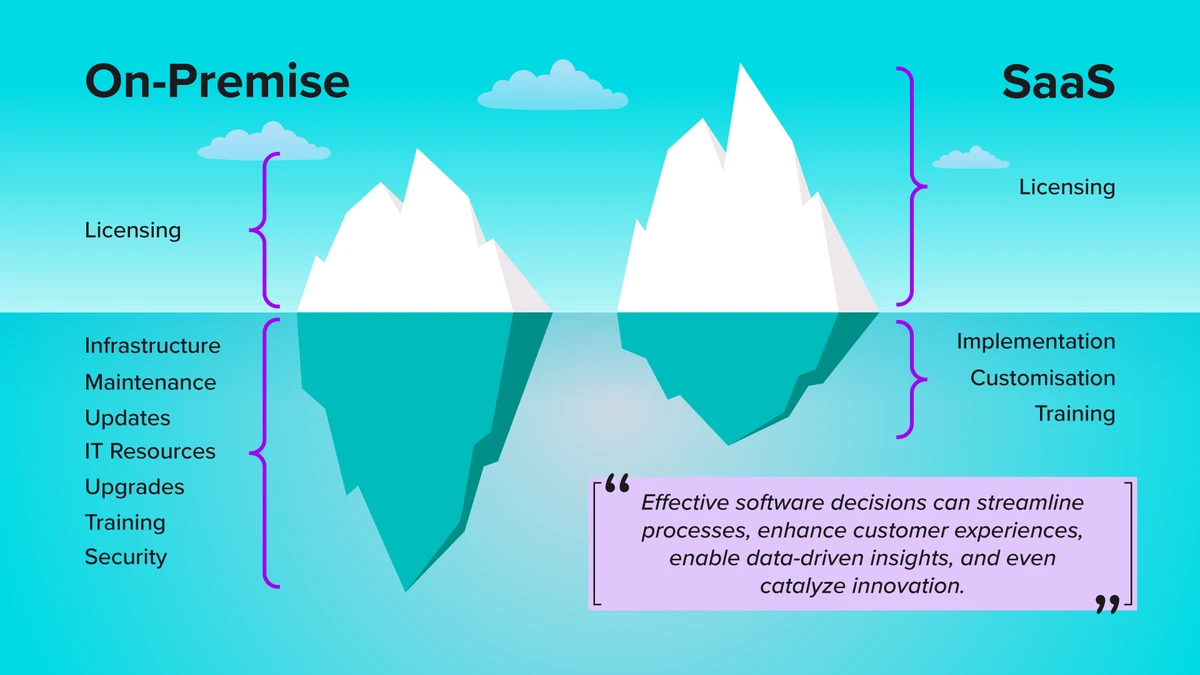
Cost structure differs markedly. SaaS CRM operates on subscription pricing, typically monthly or annual fees proportional to user count and feature tiers. This model reduces capital expenditure but incurs ongoing operational expenses. On-premise CRM involves a substantial upfront purchase of licenses, hardware, and deployment services, followed by maintenance and upgrade costs. Over time, organizations with large user bases may find on-premise more cost-effective, whereas SaaS is better suited for smaller or rapidly changing teams.
Implementation timelines reflect these differences: SaaS CRM can be deployed within days or weeks due to pre-configured environments and vendor support, whereas on-premise CRM projects often extend over months, requiring infrastructure provisioning, customization, and rigorous testing. Complexity also scales with the level of customization and integration demands, which tend to be higher for on-premise solutions.
Data Security, Compliance, and Control
Data sovereignty and regulatory compliance significantly influence CRM deployment decisions. On-premise CRM offers organizations direct control over data storage, allowing tailored security policies aligned with industry-specific regulations such as GDPR, HIPAA, or PCI-DSS. This control is critical for sectors like finance, healthcare, or government, where data residency and auditability are non-negotiable.
SaaS CRM vendors invest heavily in security infrastructure, adhering to international standards (ISO 27001, SOC 2) and implementing encryption, intrusion detection, and continuous monitoring. However, businesses must rely on third-party vendors for data protection, introducing shared responsibility models. Vendor transparency, data access controls, and incident response capabilities become essential evaluation criteria.
Vendor-managed SaaS platforms automate compliance updates and security patches, reducing internal risks of misconfiguration or outdated software. On the other hand, on-premise CRM demands dedicated IT teams to maintain security protocols and ensure continuous compliance, increasing operational complexity and costs.
Customization and Integration Capabilities
On-premise CRM solutions traditionally offer deeper customization, enabling organizations to tailor workflows, data models, and interfaces extensively. This flexibility supports unique business processes that may not align with standard CRM configurations. For instance, SugarCRM’s on-premise editions allow intricate custom modules and scripting that large enterprises leverage for competitive advantage.
SaaS CRM platforms have progressively enhanced customization capabilities through APIs, low-code/no-code tools, and marketplace apps. Integrations with third-party vendors such as Google Workspace, Microsoft 365, Slack, and Dialpad enable seamless communication and productivity enhancements. Guidesly’s integration of SaaS communications with HubSpot exemplifies how SaaS CRM supports robust ecosystem connectivity.
Legacy system integration remains a challenge for SaaS solutions, especially when proprietary or outdated on-premise systems are involved. Hybrid CRM approaches, combining cloud and on-premise components, have emerged to address this gap, enabling phased migration strategies while preserving critical customizations.
Scalability and Maintenance
SaaS CRM inherently supports dynamic scalability, where businesses can rapidly adjust user licenses and feature sets based on growth or seasonal demands without infrastructure changes. Vendor-managed cloud resources automatically allocate capacity, ensuring performance even during spikes. This elasticity is crucial for startups and rapidly expanding enterprises.
On-premise CRM scalability requires upfront capacity planning and investment in additional hardware and software licenses. Scaling often involves downtime and complex migrations, limiting agility. Moreover, maintenance responsibilities such as software updates, backup management, and hardware lifecycle fall on internal IT teams, demanding sustained resource allocation.
SaaS maintenance includes automatic updates and security patches, minimizing disruption and ensuring access to the latest features. However, organizations must trust vendor timelines and change management processes. On-premise environments allow controlled update schedules but expose the business to risks of delayed patching or configuration errors.
Business Continuity and Accessibility
SaaS CRM offers inherent advantages for business continuity, supporting remote access from any internet-connected device. This capability proved invaluable during global disruptions like the COVID-19 pandemic, enabling distributed teams to maintain customer engagement without physical office dependencies. Cloud disaster recovery features ensure rapid data restoration and failover.
On-premise CRM systems do not require internet access for internal use, providing resilience against connectivity outages. However, they often lack built-in disaster recovery unless complemented by sophisticated backup and replication strategies, which increase complexity and cost. Remote access typically requires VPNs or remote desktop solutions, adding security and usability considerations.
Education First’s rapid call center deployment using SaaS CRM demonstrates how cloud models can accelerate business continuity efforts. Conversely, organizations with stringent offline operational requirements may prefer on-premise deployments despite limitations in remote accessibility.
Cost Analysis: Total Cost of Ownership (TCO)
Analyzing TCO involves evaluating direct and indirect costs over the CRM’s lifecycle. SaaS CRM’s subscription fees cover hosting, maintenance, support, and upgrades, translating into predictable operational expenses with minimal capital outlay. This model favors organizations prioritizing cash flow management and scalability.
On-premise CRM incurs higher upfront capital expenditures for software licenses, servers, networking equipment, and deployment services. Ongoing costs include IT staffing, maintenance contracts, energy consumption, and periodic hardware refreshes. For large enterprises with sufficient IT resources and stable user bases, on-premise may yield lower long-term costs per user.
Usage patterns influence cost-effectiveness: fluctuating teams or seasonal workloads align better with SaaS’s flexible pricing, while steady, high-volume usage benefits from on-premise economies of scale. Hidden costs such as extended implementation timelines, customization efforts, and compliance overhead must also be factored into decision-making.
Cost Factor |
SaaS CRM |
On-Premise CRM |
|---|---|---|
Upfront Investment |
Low, subscription-based |
High, license and infrastructure purchase |
Ongoing Costs |
Subscription fees covering maintenance and updates |
IT staff, hardware maintenance, upgrades |
Scalability Costs |
Elastic, pay-as-you-grow |
Requires hardware and software expansion |
Implementation Cost |
Lower, faster deployment |
Higher, longer deployment cycles |
Compliance and Security |
Vendor-managed, standardized |
Customizable, internal responsibility |
Use Case Scenarios and Decision Guidance
Small to medium businesses (SMBs) and startups with limited IT staff and budgets benefit from SaaS CRM’s rapid deployment, minimal maintenance, and scalability. Companies experiencing rapid growth or seasonal fluctuations gain flexibility in user count and feature access. Education First’s experience highlights SaaS CRM’s suitability for agile, customer-facing operations.
Enterprises with strict data compliance needs (financial services, healthcare) or complex, unique business processes often prefer on-premise CRM to maintain full data control and customization. Organizations with established IT infrastructures and long-term CRM strategies can leverage on-premise deployments for cost efficiencies and tailored workflows.
Hybrid CRM deployment models are gaining traction, allowing organizations to combine cloud agility with on-premise control. For instance, critical data may reside on-premise while leveraging SaaS CRM for customer engagement and analytics. This approach mitigates risks and capitalizes on strengths of both models.
Future trends point towards increased SaaS adoption powered by AI-driven automation, enhanced integration ecosystems, and improved compliance certifications. However, on-premise CRM remains relevant where security, control, and customization outweigh cloud benefits.
FAQ
What are the main benefits of SaaS CRM over on-premise CRM?
SaaS CRM offers lower upfront costs, faster implementation, automatic updates, and easy scalability. It supports remote access and business continuity without heavy IT involvement, making it ideal for growing or resource-constrained businesses.
Which CRM deployment model offers better data security?
On-premise CRM provides more direct control over data storage and security policies, suitable for industries with strict compliance requirements. SaaS CRM vendors implement robust security measures, but data control is shared, requiring trust in vendor practices.
How does the total cost of ownership compare between SaaS and on-premise CRM?
SaaS CRM involves predictable subscription fees with minimal capital expenditure, whereas on-premise CRM has higher upfront costs but may become cost-effective over time for large user bases. Maintenance and IT staffing also impact overall costs.
Can SaaS CRM be customized as extensively as on-premise CRM?
While on-premise CRM generally allows deeper customization, modern SaaS CRM platforms provide extensive integration and configuration options through APIs and app marketplaces, enabling significant adaptation to business needs.
Is hybrid CRM deployment a viable option?
Yes, hybrid CRM combines on-premise and cloud solutions to balance control, customization, and scalability. It supports gradual migration and integrates legacy systems while leveraging cloud benefits.
SaaS CRM provides cloud-based access with lower upfront costs, faster implementation, and easy scalability, ideal for businesses needing remote access and minimal IT management. Conversely, on-premise CRM offers greater control over data and customization, better suited for organizations with strict compliance requirements or extensive IT resources, though it involves higher initial investment and maintenance. As the CRM landscape evolves, organizations should weigh operational priorities, regulatory demands, and growth trajectories to select the deployment model that best drives customer engagement and business success.
For a detailed comparison of SaaS and on-premise CRM, refer to the SugarCRM vendor whitepaper and the Technology Evaluation Centers analysis for authoritative insights on CRM deployment models.
Advertisement